


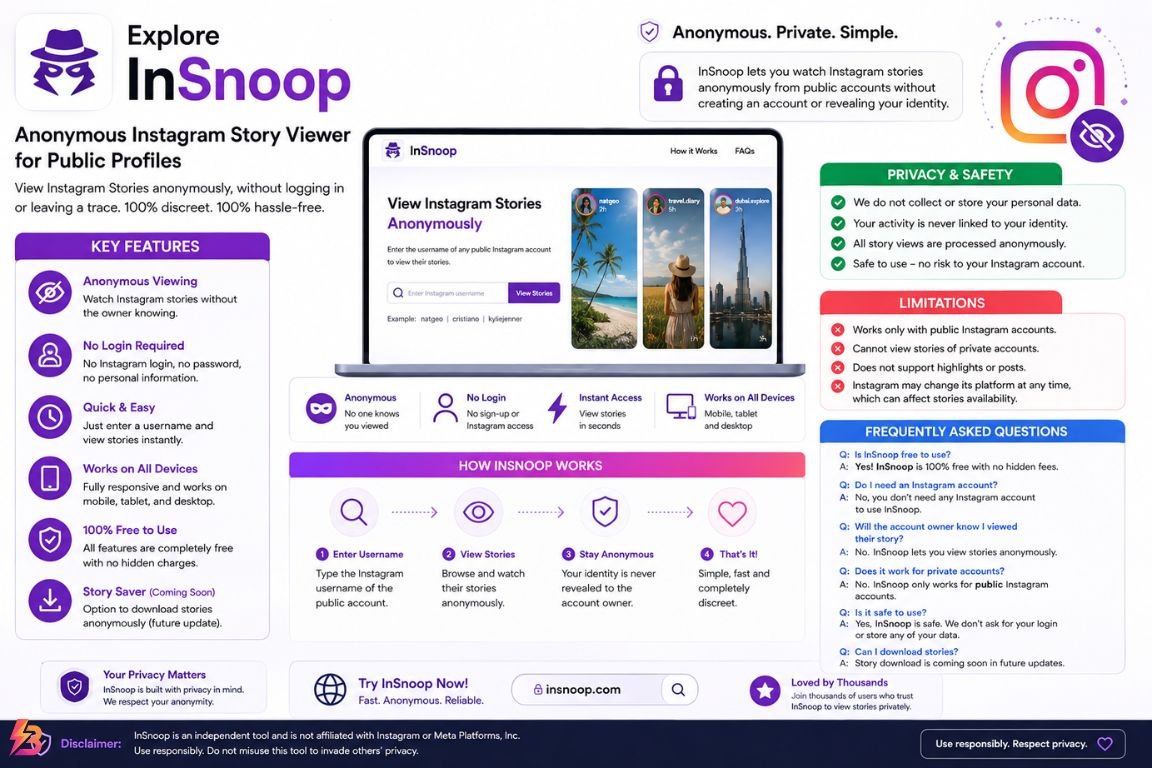
Instagram Stories are designed for quick, temporary sharing, but viewing them can sometimes feel less private than browsing ordinary public posts. When you open a Story through a logged-in Instagram account, your account can be associated with that view. InSnoop is a third-party web-based tool built around a different approach: it lets users search for public Instagram profiles and view available Stories without signing into Instagram.
This guide explains what InSnoop is, how the service works, what its anonymous Instagram viewer claims actually mean, which accounts it can access, and what users should consider before using it. It also covers downloading content, privacy limitations, safety precautions, and practical alternatives.
What Is InSnoop?
InSnoop is a browser-based Instagram viewing service that focuses on anonymous access to Stories from public Instagram accounts. Its website says users can enter an Instagram username or profile link and view available Stories without creating an account or logging into Instagram. The service also advertises access to Instagram Highlights and the ability to download some images and videos.
The main attraction is straightforward. Instead of opening Instagram while signed into your personal account, you use a separate website to look for publicly accessible content.
That makes InSnoop different from Instagram itself. It is not an official Meta product, and it does not replace Instagram’s normal account, messaging, posting, or engagement features.
The service is therefore best understood as a third-party viewing layer rather than another version of Instagram.
What Can InSnoop Be Used For?
Depending on what is currently available through the service, users may use it to:
- View Stories from public profiles
- Browse selected Instagram Highlights
- Search for public usernames
- View content without an Instagram login
- Access the service from a phone, tablet, or computer
- Download certain available media
InSnoop specifically states that private profiles cannot be viewed through its service.
That distinction matters because anonymous viewing tools sometimes get described as if they can access any Instagram account. A legitimate public-profile viewer cannot simply remove Instagram’s privacy restrictions from a private account.
How Does InSnoop Work?
The basic process is simpler than the technical terminology surrounding anonymous viewers may suggest.
First, a user identifies the public Instagram account they want to view. They then enter the account’s username or profile information into the InSnoop search field.
The service attempts to retrieve content that is publicly available and displays the results through its own interface. The user does not need to connect a personal Instagram account to perform the search.
InSnoop describes its service as requiring only a username and says that no Instagram login is necessary.
Why Does This Create a Different Viewing Experience?
When you use Instagram normally, your activity takes place inside an authenticated account session. A third-party viewer separates your browsing activity from that personal Instagram session.
That is the basic reason services such as InSnoop can advertise anonymous Story viewing.
However, the word anonymous needs some context. Being anonymous to the person who posted a Story is not the same as being anonymous to the website you are visiting.
A website can still process technical information associated with a browser connection. As a result, users should not interpret an anonymous Instagram viewer as a guarantee of complete online anonymity.
How to Use InSnoop
Using InSnoop is designed to be relatively simple because the service does not require an Instagram account.
Step 1: Find the Public Instagram Username
Start with the username of the public Instagram account you want to view.
Check the spelling carefully. A small typo can lead to the wrong profile or no results.
Step 2: Open InSnoop
Visit the InSnoop website through a browser. The current site presents a search interface for finding Instagram profiles.
Step 3: Enter the Username
Type the Instagram handle into the search box.
If the profile is publicly accessible and the service can retrieve its current content, the available Stories may appear in the results.
Step 4: View the Available Story
Select the Story you want to view.
The important distinction is that you are viewing it through the third-party service rather than opening the Story from your own logged-in Instagram account.
Step 5: Leave Without Providing Instagram Credentials
If a third-party viewer asks for your Instagram password, stop and reconsider using that service.
A public Story viewer should not need your Instagram password simply to display publicly accessible content.
Instagram Story Viewer InSnoop: What to Expect
The phrase instagram story viewer insnoop generally refers to using InSnoop specifically for viewing Instagram Stories without signing into Instagram.
The service’s current website promotes anonymous Story viewing and says users can search for a profile, select available Stories, and view them without appearing in the normal viewer list.
The experience can be useful when someone wants to browse public content without interacting with the creator.
However, results can vary. Third-party services depend on access to content that Instagram makes publicly available, and Instagram can change its systems, interfaces, access controls, or technical methods at any time.
That means a Story viewer that works one day may show incomplete results or stop working later.
Public Profiles Are the Key Requirement
InSnoop states that it supports public Instagram accounts rather than private profiles.
This is one of the most important limitations to understand.
A private Instagram account controls access to its content. A third-party site should not be treated as a legitimate method for bypassing that restriction.
The same principle applies to content that has additional access restrictions. If Instagram does not make a piece of content publicly accessible, an anonymous viewer cannot legitimately promise universal access to it.
Is InSnoop Really Anonymous?
This is probably the most important question surrounding the service.
InSnoop advertises anonymous viewing because users do not have to log into their Instagram account to watch public Stories.
That provides a narrower form of anonymity: your personal Instagram identity is not being used in the same way it would be if you opened the Story from your own account.
It does not automatically mean that nobody can identify your visit.
There are several separate privacy layers:
| Privacy question | What it means |
|---|---|
| Can the Story owner see your Instagram username? | The third-party viewer is designed to prevent your personal Instagram account from being attached to the view. |
| Does InSnoop know you visited its website? | A website can process technical information about visitors. |
| Does your internet provider know you connected to the site? | Network-level visibility can still exist even when website traffic is encrypted. |
| Is your Instagram password shared with InSnoop? | You should never provide it to a third-party Story viewer. |
| Does anonymous mean completely untraceable? | No. Those are different concepts. |
The distinction is important because privacy claims should be interpreted precisely rather than broadly.
InSnoop says it does not require registration and describes its service as privacy-focused. However, that should not be interpreted as a promise of complete anonymity across every layer of internet activity.
Can InSnoop View Private Instagram Accounts?
No. InSnoop’s own FAQ says its Story viewer currently supports public accounts and cannot view Stories from private profiles.
This is a fundamental limitation rather than a minor inconvenience.
Private profiles exist specifically to restrict who can access their content. A website claiming that it can unlock private Stories, private messages, or restricted account information should be treated with considerable caution.
You should also avoid entering another person’s password or attempting to bypass account security.
What About Close Friends Stories?
Content shared through Instagram’s restricted audience features should not be assumed to become publicly accessible through a third-party viewer.
If an account owner shares a Story only with a selected audience, an anonymous public viewer should not be expected to provide access to it.
Claims that a website can bypass these controls deserve particular scrutiny.
Does InSnoop Require an Instagram Login?
According to the current InSnoop website, no Instagram account or login is required. The service says users can enter a username and begin viewing available public content directly.
This is one of the biggest differences between InSnoop and the official Instagram experience.
A no-login design also means you should never need to enter:
- Your Instagram password
- Your Instagram security code
- Two-factor authentication codes
- Recovery codes
- Another person’s account credentials
If a website unexpectedly requests these details, do not provide them merely to view a public Story.
Can You Download Instagram Stories?
InSnoop currently advertises media downloading for available images and videos. Its website says photographs can be saved as JPEG files and videos as MP4 files.
Downloading, however, creates a separate issue from viewing.
A Story being publicly accessible does not automatically mean that you own the photograph, video, music, artwork, or other material contained in it.
Instagram’s own guidance warns that using another person’s content can raise copyright issues, including when content has simply been found online or downloaded.
For personal reference, downloading may be different from republishing the material. If you plan to upload the content elsewhere, use it commercially, edit it into another project, or distribute it publicly, consider whether you have permission or another applicable legal basis.
Is InSnoop Safe to Use?
Safety has more than one dimension.
A site can use HTTPS and still require users to make sensible privacy decisions. Likewise, a website that does not ask for an Instagram password can reduce one major credential risk without making every aspect of browsing completely private.
The current InSnoop website says it uses SSL encryption and does not require users to register.
Independent website-checking services have also reported a valid SSL certificate and an established domain history, while noting that automated safety checks are not guarantees of trustworthiness.
Safer Practices
If you decide to use an anonymous Instagram viewer, follow a few basic precautions:
- Use the official domain carefully. Avoid assuming that similarly named websites are connected to the same service.
- Never provide your Instagram password.
- Do not enter two-factor authentication codes.
- Avoid downloading suspicious browser extensions.
- Do not install unknown software simply to view a Story.
- Be cautious around aggressive pop-ups and redirects.
- Do not enter payment information for a feature advertised as free without understanding the charge.
- Review privacy information before using the service regularly.
These habits are useful beyond InSnoop. Third-party social-media tools can change ownership, domains, advertising partners, or technical behavior over time.
InSnoop vs. the Official Instagram App
The two services serve different purposes.
| Feature | InSnoop | Official Instagram |
|---|---|---|
| Instagram login | Not required according to InSnoop | Required for many account features |
| Public Story viewing | Yes, according to its website | Yes |
| Private account access | No | Controlled by Instagram’s privacy settings |
| Story interaction | Limited | Full interaction features |
| Messaging | No | Yes |
| Posting Stories | No | Yes |
| Likes and comments | Not its primary purpose | Yes |
| Account management | No | Yes |
| Anonymous viewing | Advertised for public Stories | Normal viewing can associate activity with your account |
The official Instagram app remains the full social platform. InSnoop is designed around a narrower viewing function.
That makes the choice dependent on what you are trying to accomplish. Someone managing an Instagram account needs Instagram itself. Someone interested only in viewing publicly accessible Stories without logging into an Instagram account may be looking for a third-party viewer instead.
Common Problems With Third-Party Story Viewers
Even when an anonymous viewer is functioning normally, several issues can occur.
A Profile Does Not Appear
The username may be incorrect, the profile may have changed, or the account may not be publicly accessible.
Double-check the exact handle before assuming the service is broken.
Stories Are Missing
A third-party viewer may not retrieve every piece of content available on Instagram.
Temporary technical problems, changes to Instagram’s systems, expired Stories, or access restrictions can affect what appears.
The Service Stops Working
Third-party tools depend on systems outside their control. Instagram can change how public content is delivered or accessed.
As a result, no independent viewer should be treated as permanently guaranteed.
A Website Requests Login Details
This is a major warning sign.
If you only want to view public content, there is no sensible reason to hand your Instagram password to an unfamiliar website.
Leave the page rather than attempting to satisfy the request.
Tips for Safer Anonymous Viewing
The safest approach is to minimize the amount of information you provide.
For occasional public-content viewing, you can:
- Use a current browser.
- Keep your browser and operating system updated.
- Avoid entering personal credentials.
- Check that the address is correct before using the site.
- Close suspicious pop-ups instead of clicking through them.
- Avoid downloading unknown software.
- Treat “private account viewer” claims skeptically.
- Respect the creator’s copyright when saving or reusing media.
- Avoid using anonymous tools for harassment, stalking, or unwanted monitoring.
Privacy tools can have legitimate uses, but privacy should not become an excuse to ignore another person’s boundaries.
It is also worth remembering that public content is still someone’s content. A Story may be visible to anyone while it is active, yet that does not give every viewer unlimited rights to reproduce or redistribute it.
FAQs
1. What is InSnoop used for?
InSnoop is a browser-based third-party service designed to let users view available Instagram Stories from public accounts without logging into Instagram. Its website also advertises Highlight viewing and media downloads.
2. Is InSnoop free?
The current InSnoop website states that the service is free and does not require membership or registration.
3. Can InSnoop view private Instagram accounts?
No. InSnoop states that its viewer currently works with public Instagram accounts and cannot access Stories from private profiles.
4. Does InSnoop require an Instagram password?
No. Its stated process does not require an Instagram login, username, or password. You should never provide your Instagram credentials to a third-party viewer simply to access public content.
5. Does anonymous viewing mean complete privacy?
No. Anonymous Story viewing primarily refers to keeping your personal Instagram identity out of the Story-viewing interaction. It should not be interpreted as complete anonymity from the website, your network, or every other technical system involved in accessing a webpage.
Conclusion
InSnoop is a third-party Instagram viewing website focused on public Stories and anonymous browsing without an Instagram login. Its current website says that users can search for public profiles, view available Stories and Highlights, and download certain media without creating an account.
Its biggest limitation is equally clear: private Instagram profiles are outside its stated scope. The service also should not be confused with a tool that provides complete internet anonymity.
For anyone considering an anonymous Instagram viewer InSnoop, the practical approach is to understand exactly what “anonymous” means, avoid sharing credentials, verify the site being used, and respect the ownership and privacy expectations surrounding the content.
Used with those boundaries in mind, InSnoop is best understood as a specialized browser-based way to access publicly available Instagram content rather than a replacement for Instagram itself.
